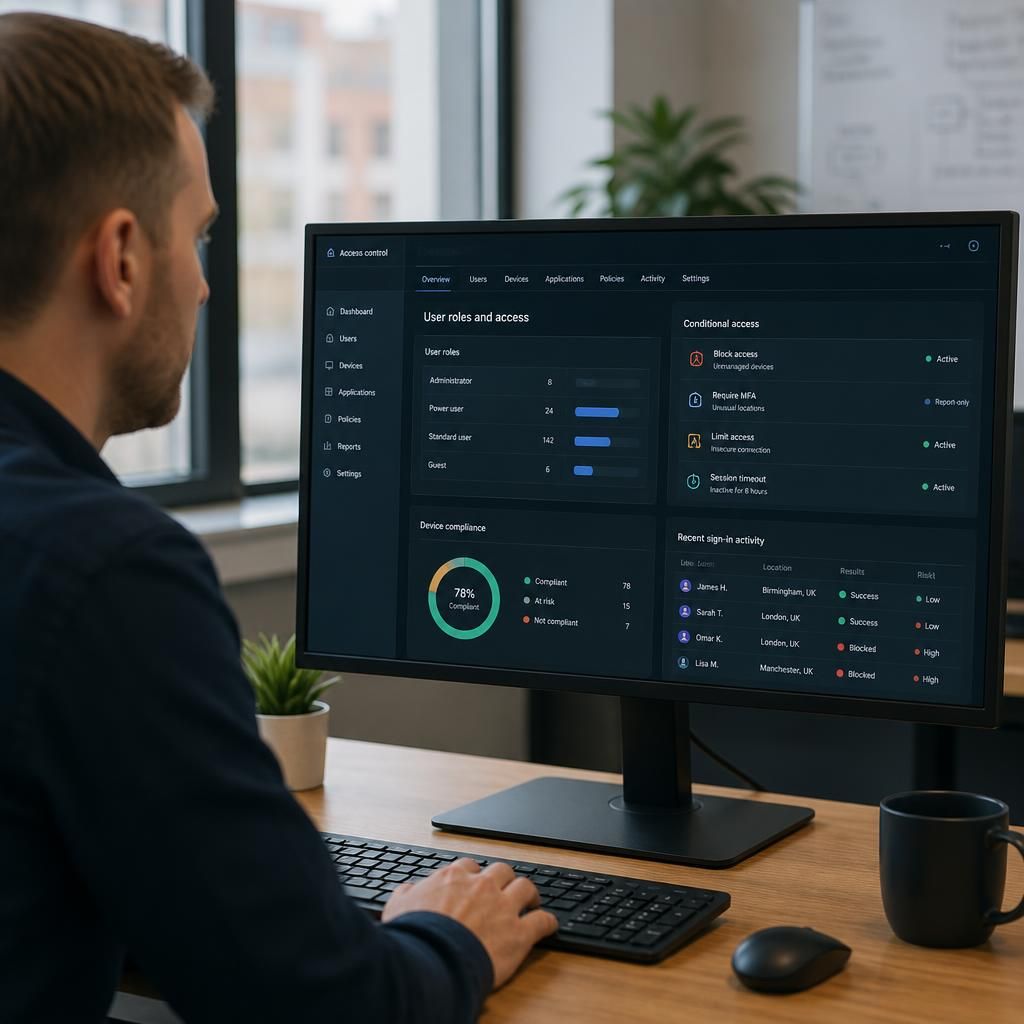
How are network access permissions controlled across users, devices and cloud services?
Network access permissions are controlled through identity verification, role-based access rules and device security policies that determine which users and devices can reach specific systems, applications and data. Centralised controls for cloud services, multi-factor authentication, least-privilege access and activity logging help enforce and review those permissions consistently.
Network access permissions are controlled by defining what access is needed for each business function, assigning it to approved users and devices, and enforcing those decisions across internal networks, applications and cloud platforms. Effective control is a continuous process: permissions must be requested, approved, implemented, reviewed and removed as people, devices, roles and services change.
Start with a clear access model
Before technical rules are created, the organisation should identify the systems and information each job requires. A finance user may need access to accounting and payment systems, while a warehouse user may only need operational applications. Access should be based on business duties rather than convenience, inherited permissions or informal requests.
An access model normally separates:
- Standard user access for routine work
- Privileged access for administration and configuration
- Guest or external access for suppliers, contractors and other third parties
- Service access for applications, integrations and automated processes
Separating these categories reduces the risk that a general user account can perform administrative tasks or that an external account can reach internal resources unnecessarily.
Control the access lifecycle
Permissions should follow a defined joiner, mover and leaver process. When someone joins, access is granted only after the relevant manager or system owner has approved the request. When their responsibilities change, obsolete access is removed and new access is added. When they leave, accounts, sessions, tokens and remote access routes must be disabled as part of the offboarding process.
This process should cover employees, temporary workers, contractors and third-party accounts. A named owner should be responsible for each important system, so that access decisions do not remain unowned or continue indefinitely.
Apply controls at more than one layer
Permissions are more reliable when they are enforced at several points rather than in a single application. Common layers include:
- Account and application controls: determine which functions, records or files a user can access inside a system.
- Network controls: restrict which network segments, servers or services can communicate with one another.
- Endpoint controls: prevent access from devices that do not meet the organisation’s security requirements.
- Cloud controls: apply access conditions to hosted applications, storage, administration portals and APIs.
- Data controls: restrict sensitive information according to its classification, location or intended use.
Using multiple layers helps contain a problem if one permission is misconfigured. For example, a user who can open an application should not automatically be able to reach every database, administrative interface or file repository connected to it.
Separate administrative access
Administrative permissions require particular care because they can change security settings, create accounts, alter systems or expose large volumes of information. Administrators should use separate accounts for administrative work and ordinary activities, with elevated access granted only when the task requires it.
Administrative rights should also be limited by system, task and duration where the technology allows. Shared administrator accounts make responsibility difficult to establish and should be avoided unless there is a documented technical reason. Emergency access arrangements should be controlled, recorded and tested rather than left as permanent unrestricted access.
Segment networks and services
Network segmentation divides infrastructure into controlled zones, such as user devices, servers, guest connectivity, operational technology and management systems. Rules between those zones can permit necessary traffic while blocking unrelated connections.
Segmentation is especially useful where a business operates multiple sites, hosts critical services or has devices with different security requirements. It can limit the spread of a compromised account or device and reduce the number of systems exposed to a local security incident. The rules should be documented in terms of the service, source, destination and business reason, rather than relying on broad allowances that are difficult to review.
Manage cloud and third-party access carefully
Cloud services often include their own roles, groups, sharing settings and application integrations. These settings need to align with the organisation’s wider access model. A user removed from an internal team should not retain access through a separate cloud group, shared folder, personal invitation or connected application.
External access should have a named sponsor, a defined purpose and an end date or review point. Shared links and anonymous access should be disabled where they are not required. Integrations and application programming interfaces should use dedicated service identities with only the permissions needed for the specific connection.
Review permissions as a business control
Access reviews should be scheduled according to the sensitivity and importance of each system. A system owner should confirm whether permissions remain appropriate, investigate exceptions and arrange removal of access that is no longer justified. Reviews should consider dormant accounts, unused groups, inherited permissions, guest access, service identities and excessive administrative rights.
Technical reports are useful, but they should be checked against current organisational information and actual job responsibilities. A permission that appears unused may still support a documented business process, while an active permission may be inappropriate even if it has not yet caused an obvious problem.
Document exceptions and changes
Access rules should be changed through a controlled process. Requests should state what is needed, why it is needed, who approved it and whether the permission is temporary or permanent. Exceptions should have an owner, an expiry or review date, and a clear explanation of the additional risk they introduce.
Changes to network rules, cloud roles and application permissions should be tested where possible before they affect production systems. This helps identify unintended access, broken business processes and conflicts between overlapping rules. Documentation should be kept current enough for another responsible administrator to understand how access is intended to work.
Practical checks for a business
- Map important systems, data stores, network zones and cloud services.
- Assign an accountable owner to each system and access group.
- Define standard access for each role and identify permissions requiring separate approval.
- Use a consistent process for joiners, role changes, leavers and third-party access.
- Separate ordinary accounts from administrative accounts.
- Remove dormant, duplicate and unnecessary accounts and groups.
- Review network and cloud sharing rules for broad or unintended access.
- Test removal of access so that offboarding controls work in practice.
- Keep evidence of approvals, reviews, exceptions and completed changes.
For a small or medium-sized organisation, these controls can be introduced in stages, beginning with critical systems and privileged access. The aim is not to create complicated rules for their own sake, but to make access decisions deliberate, traceable and proportionate to the business risk.
Network access decisions should consider context as well as the user’s assigned role. A person may be authorised to use an application, but access can still be restricted when the request comes from an unmanaged device, an unusual location, an insecure connection or a session that has been inactive for too long.
Conditional access policies apply these additional checks before allowing a connection. Depending on the risk, a policy might require stronger verification, limit access to specific functions, prevent downloads or block the session altogether. This creates a more precise control than treating every successful sign-in as equally trustworthy.
Policies should be proportionate to the information involved. Routine services may require standard checks, while financial records, personal data and administrative consoles may need stricter conditions and shorter sessions. The rules should be tested against legitimate working patterns so that security controls do not create unrecorded workarounds or encourage users to share accounts.