

How should a business backup solution protect against ransomware?
A business backup solution should protect against ransomware by keeping encrypted, isolated and tamper-resistant copies that attackers cannot alter or delete from the main network. It should also support point-in-time recovery and regular restoration testing, so the business can recover clean data without relying on compromised systems.
A business backup solution should protect against ransomware by separating backup operations from everyday user activity, controlling who can alter recovery data, and providing a documented route back to a known-clean operational state. Backup is one part of ransomware resilience: the design must reduce the chance that an attacker can compromise the backup environment at the same time as production systems.
Use a layered backup architecture. A suitable design normally includes more than one backup copy, stored using different locations or infrastructure. Copies connected directly to the production network are more exposed if an attacker obtains privileged credentials. Network separation, restricted management paths and independent storage reduce the likelihood that a ransomware event can reach every recovery copy.
Immutability is particularly important. An immutable backup cannot be edited or removed during its defined protection period, including by an administrator account that has been compromised. This is stronger than simply marking a file as read-only. The backup platform and its storage must enforce the restriction, while retention settings should preserve enough historical restore points to cover the period in which an intrusion might remain undetected.
Protect the backup management layer. Ransomware can target backup consoles, service accounts and administrator credentials because controlling these systems may allow an attacker to delete recovery data before encrypting the live environment. Practical controls include:
- Separate administrative accounts for backup management rather than shared or everyday user accounts.
- Multi-factor authentication for privileged access where supported.
- Least-privilege permissions, so operators can perform their assigned duties without unrestricted control of all backup repositories.
- Protected credentials for backup services, with unnecessary accounts and access routes removed.
- Logging and alerting for unusual deletion attempts, configuration changes, failed jobs and unexpected access to backup storage.
These controls should apply to the backup platform, its storage, its cloud management interface and any connected infrastructure. A backup is not genuinely protected if an attacker can reach it through an overlooked administrative path.
Keep meaningful recovery points. Backups should be scheduled according to how much data the organisation can afford to lose and how quickly key systems need to be restored. More frequent copies can reduce the gap between the latest usable backup and the ransomware event, but frequency alone does not make a backup safe. If malicious encryption is copied into every new version, the organisation needs earlier restore points and a retention policy that preserves them.
Retention should therefore account for delayed detection. It should include historical versions rather than retaining only the latest copy, and it should be reviewed when the business changes its systems, data volumes or regulatory obligations. The right policy differs between, for example, a shared file system, a database and a critical application.
Make recovery selective and controlled. During an incident, restoring everything immediately can reintroduce compromised accounts, malicious scripts or infected files. A recovery procedure should identify the affected systems, establish a clean restoration point and prioritise the services required to operate the business. Restored systems should be checked before they are reconnected to the wider network, with privileged credentials reset where compromise is suspected.
Recovery planning should also cover dependencies. A server may rely on identity services, application databases, configuration files, licences or network settings. Restoring an individual file without its permissions or application context may not return the business process to working order. Documented recovery steps help the organisation understand what must be restored first and who is responsible for each decision.
Do not rely on snapshots alone. Snapshots can be useful for rapid rollback, but they may share infrastructure, credentials or administrative controls with the systems they protect. If ransomware reaches the underlying platform, snapshots may be encrypted or deleted as well. They should form part of a wider backup design, not serve as the only recovery method.
Testing should include realistic ransomware scenarios rather than only checking that a backup job reports as successful. A test can verify whether recovery points can be accessed, whether files and applications open correctly, whether permissions remain usable and whether the documented sequence works for the people responsible for recovery. Results should be recorded, weaknesses corrected and the process revisited after major infrastructure changes.
For a small or medium-sized organisation without a large internal IT function, these design decisions can be difficult to maintain consistently. S2 Technology Group can advise businesses around Stourbridge and neighbouring areas on backup architecture, access controls, retention and recovery planning as part of a broader managed IT and cyber security approach.
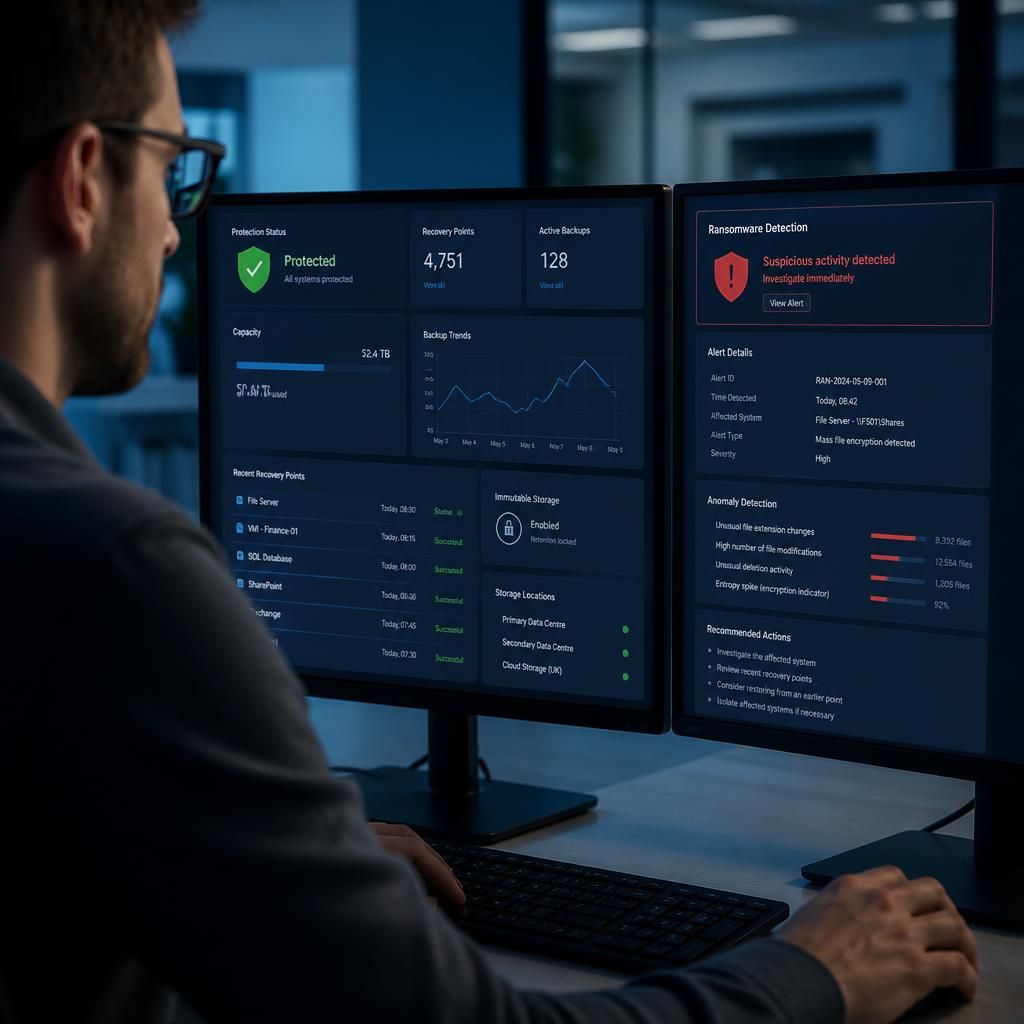
A ransomware-resilient backup solution should monitor for unusual changes in the data it is copying, such as sudden mass renaming, encryption or deletion of files. This can help distinguish a normal backup from one that is faithfully preserving the effects of an attack.
These alerts should lead to an investigation rather than an automatic assumption that the latest recovery point is safe. The organisation can then compare recent versions, identify when suspicious activity began and select an earlier point for recovery if necessary. Anomaly detection supports ransomware protection, but it should complement protected retention and controlled restoration rather than replace them.