

Can business VoIP phone systems support multiple office locations?
Yes. A business VoIP phone system can connect multiple office locations through a shared cloud-based platform, allowing users to call between sites, use common numbering and extensions, and transfer calls as if they were on one phone system. Each location still requires suitable internet connectivity, network configuration and user management to maintain consistent call quality and access.
Business VoIP phone systems can support multiple office locations by managing users, numbers, call routing and features across a coordinated telephony environment. The important distinction is between simply giving each site internet-based phones and designing a system that reflects how the organisation actually operates. A suitable solution can provide central oversight while allowing each office to retain appropriate local routing, numbering and operational rules.
Centralised management with local control
Multi-site VoIP is usually administered from a central portal. This allows authorised administrators to manage users, extensions, devices, hunt groups, voicemail settings and call permissions without configuring every handset individually. Changes such as moving an employee to another office or adding a new location can therefore be handled through the same management structure.
Central administration does not mean every location must operate identically. Each office may need its own reception group, opening message, department queues, business numbers or call-routing rules. A well-designed system separates organisation-wide policies from site-specific settings, so that standardisation does not prevent each location from working in a practical way.
Numbering and call routing
Businesses with multiple premises should decide how their numbering plan will work before deployment. Options may include:
- a consistent extension structure across the organisation;
- local geographic numbers for individual offices;
- central numbers routed to a department or reception team;
- separate call queues for each site; and
- rules based on the caller’s number, the number dialled, the time of day or the user’s location.
The right arrangement depends on whether customers contact a particular branch, a central team or an individual employee. It also affects how calls are presented to staff and how return calls are made. These details should be documented so that a user working from another office or remotely does not accidentally present the wrong outbound number.
Network design is critical
VoIP turns voice into network traffic, so each office needs an appropriate connection, internal network and configuration. Bandwidth is only one consideration. Latency, jitter, packet loss, firewall rules and the performance of switches and wireless networks can all affect speech quality.
Voice traffic is commonly separated from general data traffic using a dedicated voice VLAN or equivalent network policy. Quality-of-service rules can then prioritise calls when employees are using cloud applications, transferring large files or accessing other central systems. Firewalls and routers must also be configured to handle the chosen VoIP service without exposing unnecessary services to the internet.
Where offices use different internet providers or network designs, the implementation should assess each site individually. A configuration that works well in one building may not be suitable for another, particularly where there are older switches, congested wireless networks or restrictive security policies.
Supporting mobile and hybrid working
One advantage of a multi-location system is that a user’s telephony profile does not have to be tied permanently to a desk or building. Depending on the platform, staff may use a desk phone, computer application or mobile application while retaining the permissions and call-handling rules assigned to them.
This can support employees who move between offices, but it requires careful device and access management. Administrators should control which devices may register, apply strong authentication and remove access promptly when a device is lost or an employee leaves. Personal devices may also require a clear policy covering business calls, company data and privacy.
Resilience and continuity
A multi-site design should consider what happens if an office loses its local internet connection, power or internal network. Possible measures include routing incoming calls to another location, providing alternative user devices, maintaining suitable network redundancy or using a fallback destination for important numbers. The appropriate approach depends on the business’s operational requirements and the degree of dependency on telephony.
Resilience should be tested rather than assumed. A deployment plan should identify how calls are redirected, who is authorised to change routing, how staff are informed and how normal service is restored. It is also sensible to keep an up-to-date record of numbers, users, devices, routing rules and site dependencies.
Security and governance
Each additional office increases the number of networks, devices and users that must be governed. Access should follow the principle of least privilege, with separate administrator roles where appropriate. The system should be reviewed for unusual registration attempts, unauthorised configuration changes, weak credentials and devices that no longer need access.
Call recording, voicemail, call logs and contact information may contain personal or commercially sensitive data. A business should define retention, access and deletion rules, and confirm that recording announcements and handling procedures meet its legal and contractual obligations. Security also extends to the local network, endpoint devices and any integrations used to handle customer information.
Planning a multi-office deployment
- Map each office, user, department, number and existing phone service.
- Document how calls should enter, queue, overflow and leave the organisation.
- Assess connectivity, network equipment, firewall policies and voice prioritisation at each site.
- Define permissions, device standards, recording rules and administrative responsibilities.
- Test representative call paths, including internal, external, transferred and redirected calls.
- Train staff on the features relevant to their role and provide clear procedures for reporting faults.
S2 Technology Group can advise businesses around Stourbridge and neighbouring areas on the network, security and operational considerations involved in extending VoIP across multiple premises. The most effective design is one that matches the organisation’s structure, preserves clear control over users and numbers, and remains manageable as offices and teams change.
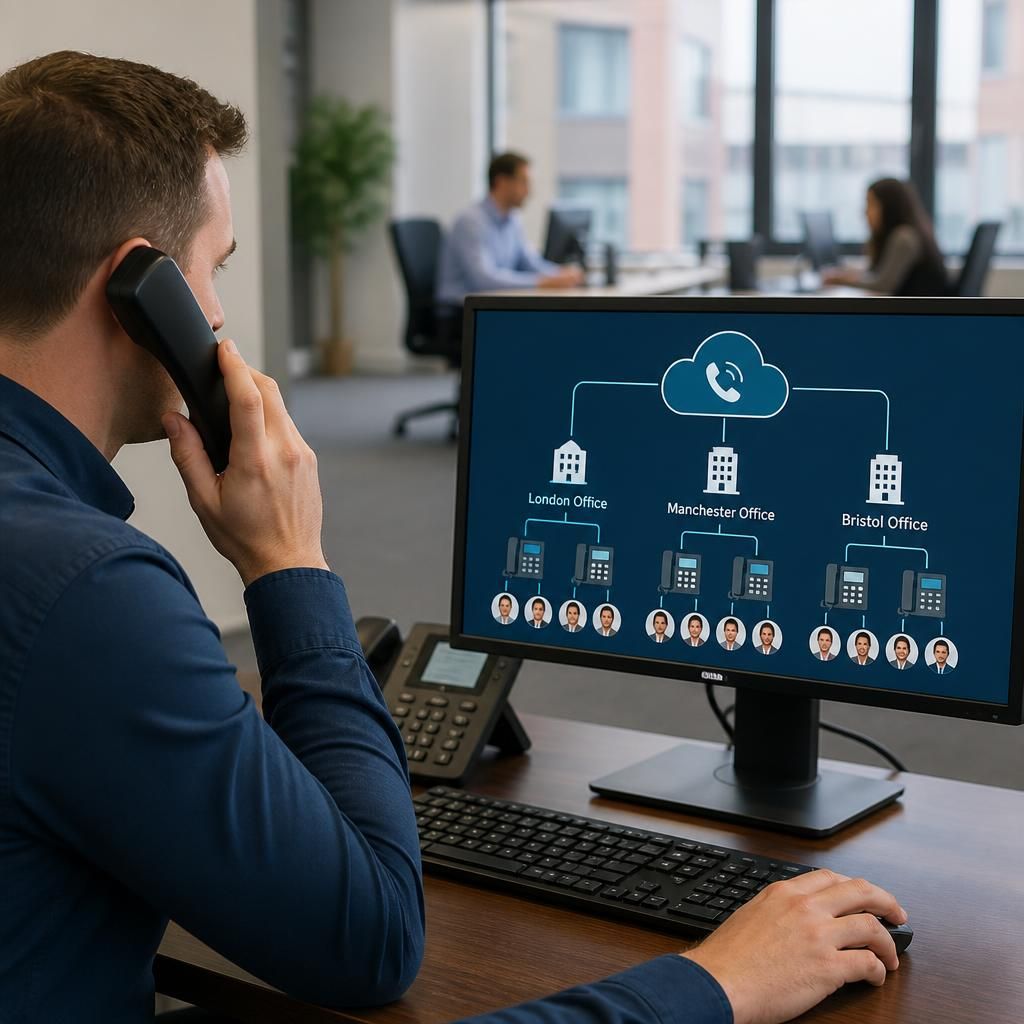
A multi-office VoIP system can operate as one telephony service while keeping each site distinguishable for administration, reporting and day-to-day management. This structure avoids the complexity of running entirely separate phone systems without losing visibility of how individual offices use their services.
Site-based controls can be used to organise:
- users, departments and devices by office;
- call records and usage reports for each location;
- local administrators with responsibility for a particular site; and
- different permissions or telephony features where operational needs vary.
This arrangement is useful when offices have different teams, budgets or customer responsibilities. It also makes organisational changes easier to track: when employees move between locations, their profile can be reassigned without creating a separate telephone environment. The exact controls depend on the VoIP platform, so the proposed design should confirm which reports, roles and site-level settings are available before implementation.