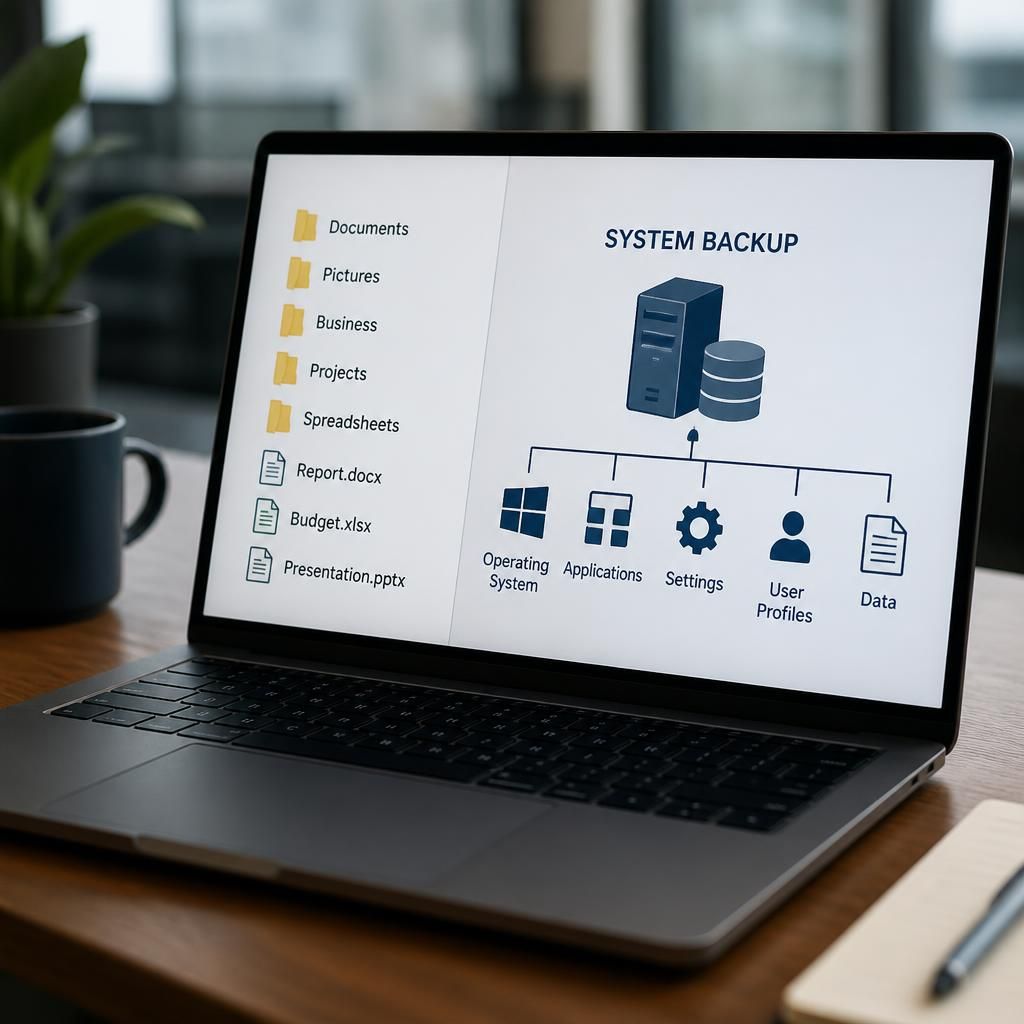
What is the difference between file backup and system backup software?
File backup software copies selected files and folders, while system backup software captures the operating system, applications, settings and data that make up a complete working environment. File backups are suited to recovering individual documents, whereas system backups support restoration of an entire computer or server after major failure.
File backup and system backup software differ mainly in the scope of the data they protect and the way that data is restored. File backup software protects selected documents, folders or application data, while system backup software records a broader image of a computer or server, including the operating system, installed applications, configuration and user data. The right choice depends on whether the priority is recovering individual items or rebuilding a complete working environment.
File backup software is designed for granular recovery. An administrator or user can usually select specific folders, file types, shared drives or application data, then restore an individual file or an earlier version without affecting the rest of the device. This is useful when data has been deleted accidentally, overwritten, corrupted or encrypted by malware, but the underlying computer is still usable.
System backup software takes a wider approach. It may capture the contents and structure of an entire physical computer, virtual machine or server so that the backed-up environment can be restored to the same hardware, replacement hardware or a suitable virtual platform. Depending on the software and configuration, this can include:
- The operating system and boot information
- Installed applications and their supporting components
- System settings, drivers and configuration files
- User profiles, permissions and locally stored data
- Server roles, services and other components needed to operate the workload
This distinction affects the type of failure each backup is intended to address. File backup is generally appropriate for accidental deletion, unwanted changes and the recovery of a small number of files. System backup is more appropriate when a device will not boot, storage has failed, an operating system has become corrupted, or a server needs to be rebuilt after a major incident.
Restoration methods also differ. A file restore normally involves choosing a recovery point and copying selected items back to their original location or to an alternative location. A system restore can involve preparing replacement storage or hardware, restoring the system image, and checking that applications, services, users and dependencies operate correctly. It therefore tends to require more planning and may involve a longer recovery process, particularly for complex servers.
System backup does not automatically make file backup unnecessary. A complete system image can contain files, but restoring one document from a large image may be less convenient than restoring it from a file-level backup. Conversely, file backup alone may not preserve the operating system and application environment needed to make a failed server operational again. Many organisations therefore use both approaches, combining granular file recovery with broader system recovery.
The two types can also differ in how they handle changes. File backup software commonly identifies new or modified files and transfers those items, which can make it suitable for frequently changing user data. System backup software may use full, incremental or synthetic image methods to record changes to the protected environment. The precise storage requirements and backup duration depend on the workload, the change rate, the retention policy and the technology used.
Application consistency is another important consideration for servers. A simple copy of files may not produce a usable backup if an application is writing to a database or keeping data in memory while the backup runs. Software intended for system or workload protection may coordinate with the operating system and applications to create a consistent recovery point. This should be checked for each business-critical application rather than assumed from the label used by the backup product.
Neither approach should be assessed solely by asking whether a backup completed successfully. The organisation should establish what it needs to recover, how much data it can afford to lose between backup points, and how quickly each type of workload must be usable again. It should also test restores, verify that backup copies are protected from unauthorised access and ransomware, and confirm that retention settings cover operational and legal requirements.
When comparing platforms, check whether they support the relevant physical devices, virtual machines, servers, cloud workloads and business applications. Also examine whether they provide file-level and full-system recovery, maintain useful version history, preserve required permissions and metadata, encrypt backup copies, and report failures clearly to administrators. A system that can create an image but cannot restore it to an available recovery target may not meet the organisation’s practical needs.
For a small or growing business, a sensible design often protects user files at an appropriate frequency and creates system-level backups for important computers and servers. The balance should be based on business impact rather than on the backup type alone. Critical workloads may require application-aware system protection, while less critical endpoints may need reliable file recovery and a separate method for rebuilding the device.
In summary, file backup software is primarily concerned with recovering selected data, whereas system backup software is concerned with recovering an entire operating environment. File protection offers precision; system protection supports broader disaster recovery. Using one, the other, or both should follow an assessment of the systems, applications and recovery scenarios that matter to the organisation.
The label used by a backup product does not always define everything it protects. A system backup may cover only the operating-system disk, while business data stored on a separate volume, attached storage or a cloud service may require a separate protection method. File backup software may also exclude system folders, temporary data, databases or files that are open when the job runs.
Before choosing between the two, review the protection scope in the product documentation. Check which drives, folders, databases, user profiles and application data are included by default, and identify any exclusions that must be configured manually. This confirms whether the proposed backup covers the complete workload or only part of the environment.