

How will user identity be managed during Microsoft 365 migration?
User identity during a Microsoft 365 migration is managed by mapping existing accounts to the target environment, preserving appropriate usernames and permissions, and planning how identities will be synchronised or provisioned. The process should also include sign-in security, multi-factor authentication, access policies and testing so users can reach the applications and data they need after the move.
User identity management during a Microsoft 365 migration is the controlled transfer of responsibility for accounts, authentication, group membership and administrative access from the existing environment to the new one. The objective is not simply to create matching user records; it is to maintain a clear, auditable relationship between each person, their sign-in identity, their permissions and the services they are authorised to use throughout the transition.
Begin with an identity inventory
Before making changes, the migration plan should identify every identity that may affect the project. This normally includes standard user accounts, administrators, shared mailboxes, room and equipment accounts, guest users, external collaborators, service accounts and accounts used by applications or automated processes. Accounts that appear inactive may still support a business process, so their purpose and ownership should be confirmed before they are removed or excluded.
The inventory should record the account’s owner, business function, department, group memberships, licensing requirement, mailbox or collaboration data, and any connected application. It should also identify duplicate accounts, inconsistent naming, disabled accounts and records with no clear owner. Cleaning up these issues before migration reduces the risk of transferring obsolete access or creating multiple identities for the same person.
Decide which directory is authoritative
Where an organisation has an existing local directory, cloud directory or identity platform, the migration must establish which system is the source of truth during each stage. Without this decision, changes made in one location can be overwritten by another system, resulting in incorrect names, group memberships or account status.
A defined authority model should cover:
- where new starters and leavers are created or disabled;
- which system controls changes to names, job titles and departments;
- how organisational groups are maintained;
- how account ownership is recorded;
- when control will move from the old environment to Microsoft 365; and
- who can approve identity and access changes during the project.
This is particularly important where a period of coexistence is required. Temporary arrangements should have an owner and an end point rather than becoming an undocumented permanent configuration.
Design the sign-in experience
Users should understand which account they will use, where they will sign in and what changes they may notice. A migration can expose differences between an internal username, a primary email address and the address presented to cloud services. These identifiers should be reviewed for consistency, particularly where users have aliases, multiple domains or accounts created through earlier acquisitions.
Authentication design should also consider password handling. Depending on the source environment and the chosen migration method, existing passwords may be retained, securely synchronised or replaced as part of the transition. If users must create new credentials, the process should explain the required steps without sharing passwords through insecure channels. Any recovery method should be assigned to the correct individual and protected from unauthorised use.
Multi-factor authentication and sign-in controls should be introduced in a planned sequence. Applying a new requirement to every account without checking dependencies can lock out users, administrators or automated processes. A controlled rollout should account for different user groups, approved authentication methods, recovery arrangements and exceptions. Exceptions should be documented, limited and reviewed rather than left as permanent gaps in security.
Preserve access through groups and roles
Access is often granted through groups rather than directly to individual users. For that reason, reviewing group membership can be as important as reviewing the accounts themselves. Each group should have a defined purpose, an owner and a clear set of members. Nested groups, mail-enabled groups, security groups and application-specific groups may behave differently after migration and should not be assumed to transfer identically.
Administrative roles require separate treatment. The project should identify global administrators, delegated administrators and users with elevated rights, then confirm that each level of access remains justified. Day-to-day user accounts should not be used for unnecessary administrative activity, and emergency administrator accounts should have controlled ownership and secure recovery arrangements. A written record of privileged access makes later reviews more reliable.
Shared accounts and service identities also need careful handling. A shared mailbox should have named delegates rather than an unknown group of users. An account used by a backup job, integration or line-of-business application may not behave like a normal employee account and may require new credentials, permissions or configuration. Removing an old identity before its dependent process has been identified can interrupt an otherwise successful migration.
Manage the transition in stages
Identity changes should be sequenced around the migration plan. A typical approach is to validate a controlled group of accounts, review the results, and then extend the process to the remaining users. The pilot should include different job roles and account types, not only technically simple users. It should test sign-in, access to required services, group-based permissions, password recovery and the handling of a leaver or disabled account.
During coexistence, the project team should maintain a change freeze or formal change-control process for identity-related updates. Unplanned changes to names, aliases, groups or administrative roles can make troubleshooting difficult because it becomes unclear whether an issue was caused by the migration or by a later manual change. A record of each change, approval and result provides useful evidence when resolving discrepancies.
Users should receive clear instructions before their identity changes take effect. Communications should explain the account they should use, any required sign-in action, the applications affected and the approved route for reporting an access problem. Instructions should avoid exposing personal or administrative information and should be available in a form users can refer to during the transition.
Validate ownership and compliance after cutover
Identity management does not end when users can sign in. After cutover, the organisation should confirm that former administrators no longer retain unnecessary access, departed users are disabled, guest accounts have appropriate sponsors and shared resources have current owners. Access reviews should check both direct permissions and permissions inherited through groups.
Audit records should be retained for significant identity events, including account creation, privilege changes, authentication changes, group membership updates and account disablement. These records help establish who approved access and whether the organisation’s procedures are being followed. They also support investigation if an account behaves unexpectedly after migration.
A documented post-migration process should define how new starters, role changes, leavers, contractors and temporary access will be handled in the new environment. It should also state how often groups, guest users and privileged roles are reviewed. S2 Technology Group can help organisations around Stourbridge and neighbouring areas assess these identity controls as part of a structured Microsoft 365 migration, alongside wider IT support and security planning.
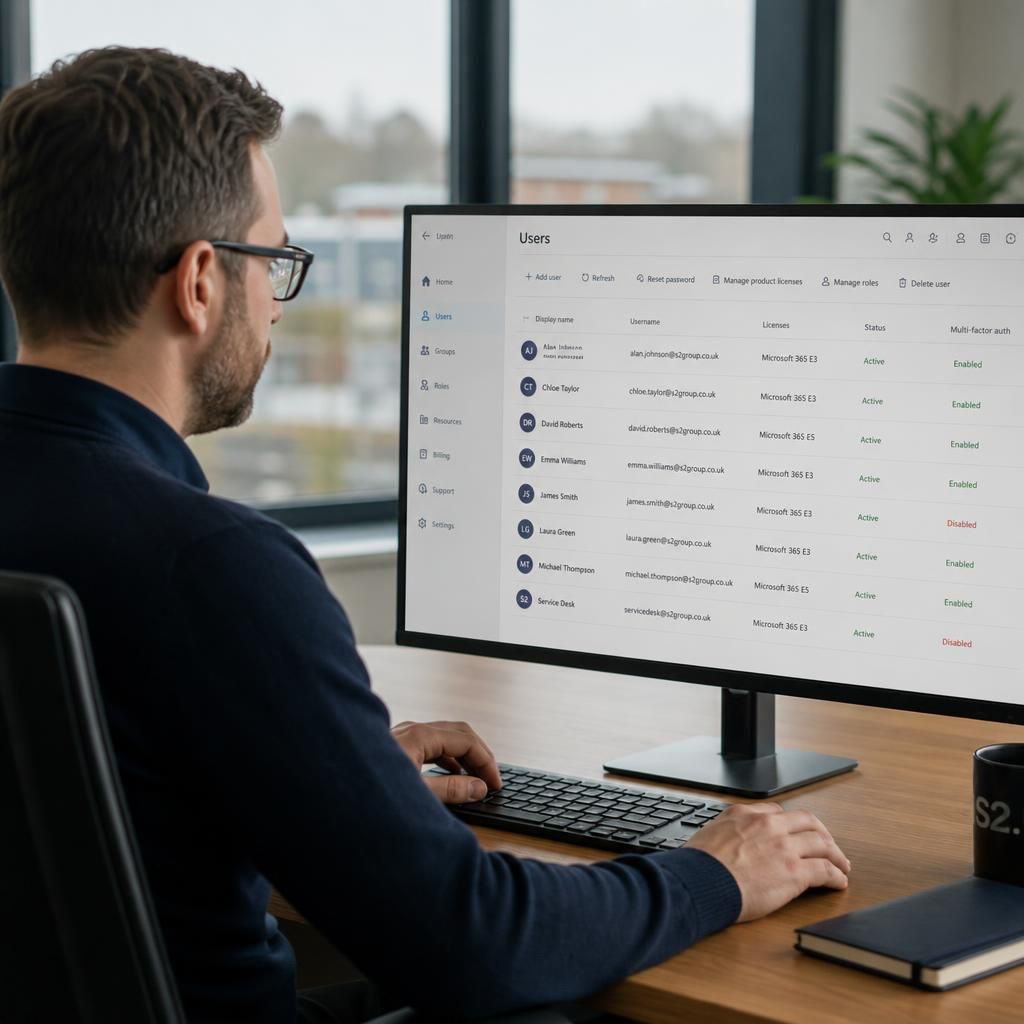
Identity matching is the process of proving that each account in the Microsoft 365 target environment belongs to the correct person or service, rather than relying only on a matching display name or email address. This is important where users have aliases, duplicate records, changed names or accounts created in separate directories.
Before accounts are linked, the migration team should compare reliable attributes such as the current sign-in name, primary email address, aliases, department, account status and confirmed ownership. Where available, a persistent directory identifier can provide stronger evidence than a name that may change. Potential matches should be placed in an exception report for review instead of being linked automatically.
The results should then be reconciled against the migration list, licensing records and application dependencies. This provides a clear record of which identity was matched, who approved any exception and what action is required for unresolved accounts. Separating confirmed matches from uncertain records helps prevent data being attached to the wrong user and makes identity issues easier to investigate during cutover.
Discuss managing user identity during your Microsoft 365 migration
For guidance on planning identity controls for your Microsoft 365 migration, speak to S2 Technology Group about reviewing your proposed approach and dependencies. This can help define the practical steps needed before account changes are made.