How will legacy data be handled during Microsoft 365 migration?
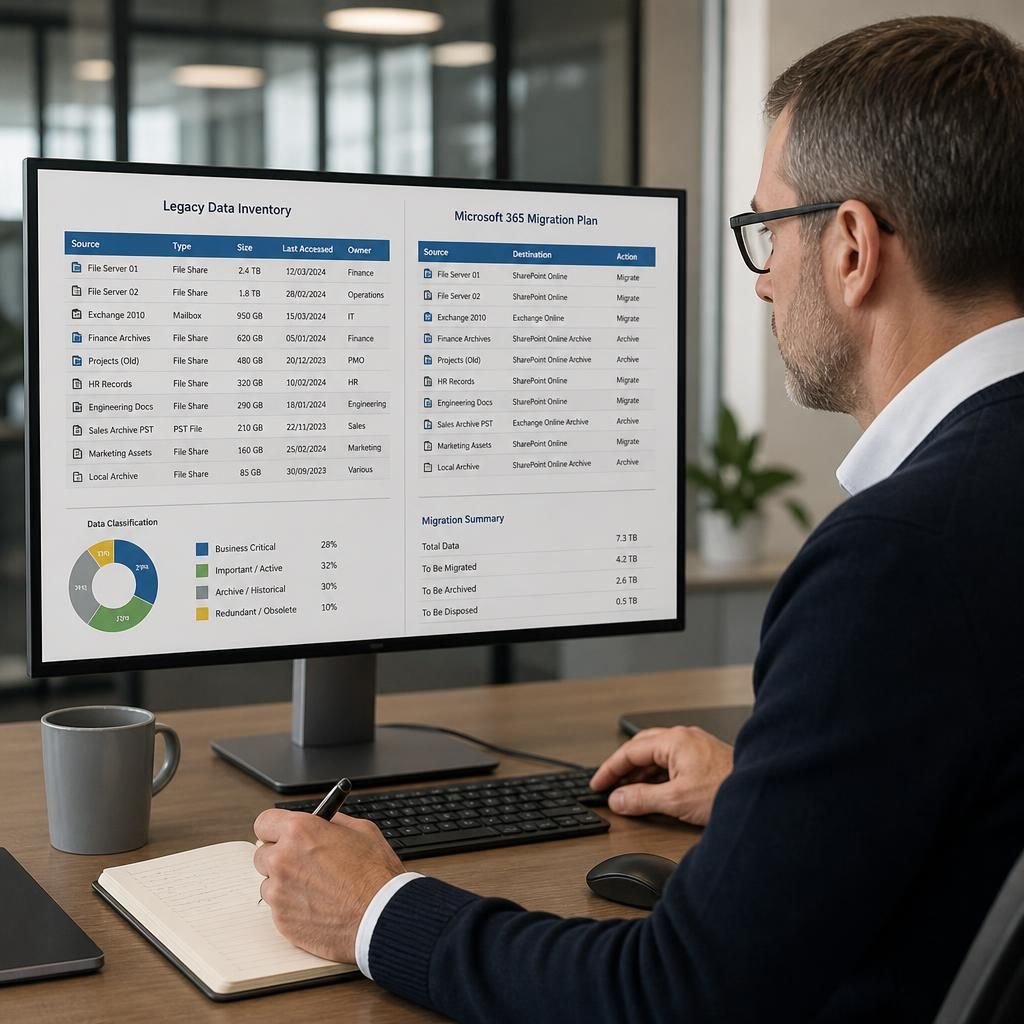
Legacy data is assessed before migration, then classified for transfer, secure archiving or disposal according to its business value, access requirements and retention obligations. Data that remains relevant is migrated into suitable Microsoft 365 locations with permissions and structure preserved where practical, while archived records remain securely stored and accessible to authorised users.
Legacy data handling in a Microsoft 365 migration involves deciding what should remain operational, what should be retained as historical evidence and what can be securely removed. The process must preserve the information needed for day-to-day work, legal and regulatory obligations, internal investigations and business continuity, while avoiding the unnecessary transfer of obsolete, duplicated or unreliable material.
A sound approach begins with a detailed inventory rather than a simple copy of existing folders and mailboxes. The inventory should identify:
- Where data is held, including file servers, removable media, local computers, email archives and line-of-business systems.
- Who owns each dataset and which teams still use it.
- The file types, approximate volumes, age and modification history involved.
- Whether information contains personal, commercially sensitive or regulated content.
- Any technical dependencies, such as applications that rely on particular folder paths, file formats or permissions.
This review often exposes several different categories of legacy data. Some records are still active and need to be available in ordinary working locations. Others are rarely accessed but must be retained for contractual, financial, employment or regulatory reasons. A further category may consist of duplicates, temporary files, obsolete exports or records whose retention period has expired. Treating all three categories alike increases migration effort and can make useful information harder to find.
Before any transfer, the organisation should agree its retention rules and ownership responsibilities. Retention should be based on the type of record and the reason it must be kept, not simply on its age. A legal hold, investigation or unresolved dispute may require particular information to be preserved even where it would normally be eligible for deletion. Conversely, keeping data indefinitely can create unnecessary privacy, security and storage risks. Decisions should be documented so that the organisation can explain why information was moved, retained, restricted or deleted.
Data quality also needs attention. Legacy repositories commonly contain inconsistent naming, nested folders, duplicate documents, obsolete versions and files that cannot be opened with current software. Migration planning should define how duplicates will be identified, whether version history is required and what happens to unsupported or corrupted files. Where a file cannot be migrated in its original form, an approved alternative may be to preserve it in a readable format alongside an explanation of the conversion and its limitations.
Historical email requires particular care. Mailbox archives and exported mail files can contain business records mixed with personal correspondence, automated messages and duplicates. The organisation should determine which mail belongs in an active mailbox, which should be retained as a searchable archive and which has no continuing purpose. Important attributes such as sender, recipient, date, subject, attachments and folder context should be checked because losing them can reduce the evidential value of a message.
For documents, the destination should support the way the information is used rather than reproduce every historical folder exactly. Active working documents may require collaborative access, while fixed records may need tighter editing controls. Access should be reviewed against current job responsibilities instead of copying historic permissions without question. Old groups and inherited access rights can give people broader visibility than intended, particularly after staff changes or organisational restructuring.
Secure handling applies throughout the process, including extraction, temporary storage, transfer and final disposal. Migration copies should be encrypted where appropriate, access should be limited to authorised project personnel and temporary working files should have a defined deletion procedure. A record of transfers, exceptions and approvals creates an audit trail and helps demonstrate that sensitive information was handled consistently.
After transfer, validation should test more than whether the expected number of files appears in the destination. Useful checks include:
- Comparing source and destination inventories.
- Opening representative files from each important format.
- Checking document names, dates, owners, versions and attachments.
- Testing searches for known records.
- Confirming that restricted information is visible only to the intended users.
- Asking business owners to verify that critical historical records can be located and understood.
The original repository should not normally be removed immediately after a successful copy. A controlled read-only period gives users an opportunity to identify omissions or incorrect permissions and provides a reference point while validation is completed. Once the retention, validation and approval steps are complete, the old system can be decommissioned or its remaining content securely destroyed in line with the documented decision.
For a small or medium-sized organisation, this work is best managed as a governed data exercise rather than an isolated technical transfer. S2 Technology Group can support the assessment, information mapping, migration planning, access review and validation needed to handle historical records responsibly as part of a wider Microsoft 365 migration.
An archive is not the same as a backup during a Microsoft 365 migration. A backup is designed to restore systems or data after loss, corruption or accidental deletion, whereas an archive preserves selected business records for reference, governance or compliance. Legacy information that is no longer needed for everyday editing should therefore be placed in an archive with defined ownership, access controls, search capabilities and retention rules, rather than left in a backup repository that users cannot readily consult.
This distinction should be documented in the migration plan. It clarifies which historical records must remain available to authorised staff, how they will be retrieved, and when they can be reviewed for disposal. It also prevents the organisation from treating every old copy as a permanent record simply because it exists somewhere in the recovery environment.