

How should Microsoft 365 licensing be planned before migration?
Microsoft 365 licensing should be planned by auditing users, devices and workloads, then matching each requirement to the appropriate licence and security features. Confirm subscription dependencies, add-ons, user assignments and renewal arrangements before migration so access is consistent and costs remain controlled.
Microsoft 365 licensing should be planned as part of the migration design, not treated as an administrative task after the move. The plan should define which people and workloads need access, what level of functionality and protection each role requires, how licences will be assigned, and how the organisation will control changes after migration.
Start with role-based requirements. Group users by how they work rather than selecting a subscription individually for every person. Typical groups may include office-based staff, mobile workers, managers, temporary workers, administrators and users who only need email or collaboration access. For each group, document the applications required, the devices used, collaboration needs, data access and security controls. This creates a consistent basis for selecting licences and reduces the risk of paying for features that a role does not use.
Role-based planning should still allow for exceptions. A user may need additional protection because they handle sensitive information, administer systems or access several business locations. Record these exceptions separately so that enhanced licensing is assigned deliberately rather than becoming an uncontrolled default.
Separate core access from optional capabilities. A Microsoft 365 subscription can provide a bundle of services, while separate add-ons may be needed for particular security, compliance, voice or analytics requirements. Map each proposed capability to the users who need it and identify whether it is included in the base subscription or requires an additional entitlement. This prevents a migration plan from assuming that every desired feature is available to every user automatically.
Check the licensing consequences of shared resources as well. Shared mailboxes, meeting rooms, equipment accounts, distribution lists, guest access and application identities do not always follow the same rules as standard user accounts. Establish which accounts require interactive sign-in, which are used only as shared resources and which are service identities. Their intended use should be documented and reviewed against the applicable licensing terms before they are created or transferred.
Plan for migration states, not just the final state. During a migration, users may temporarily require access to both existing and new services. Determine whether coexistence, pilot groups, staged mail flow or parallel access creates any additional licensing requirements. Include test accounts and migration administrators in the plan, while avoiding the assumption that temporary accounts can be left licensed indefinitely. Set an owner and removal date for anything created only for the project.
Licensing also needs to support the chosen identity model. If accounts are synchronised from an existing directory, decide how licence assignment will be triggered and how changes will be handled when a user joins, changes role or leaves. Group-based assignment can make this process more consistent, but the groups need clear ownership and documented rules. Direct assignments may be appropriate for exceptions, provided they are recorded and reviewed.
Model cost and entitlement changes over time. Prepare a simple licensing schedule showing each subscription, its purpose, assigned users, available capacity, billing arrangement, renewal date and responsible owner. Compare the planned requirement with the current estate and identify licences that will be retired, replaced or added. Consider likely organisational changes without inventing growth assumptions: new departments, role changes, acquisitions, temporary workers and reductions in headcount can all affect the required mix.
Do not rely solely on the number of current employees. Review inactive accounts, duplicate identities, former users, test accounts and accounts retained for legal or operational reasons. An account that must retain data may need a different treatment from an account that still needs interactive access. Define the offboarding process so that removing a user’s licence does not unintentionally remove access to information that must be retained.
Include security and compliance requirements in the selection. Licensing decisions can affect the controls available for identity protection, device management, information protection, auditing and retention. Identify the organisation’s policy requirements first, then verify that the selected subscriptions and add-ons provide the necessary controls for the relevant users and data. Pay particular attention to privileged administrators, users accessing sensitive information and devices that are not fully managed by the organisation.
Retention and compliance requirements should be considered before migration because they may influence mailbox, document and collaboration-service design. Confirm who needs access to compliance features, how long information must be retained, and which policies apply to each data type. Licensing should support the intended policy rather than being selected solely on the basis of application access.
Validate the plan before assigning production licences. Use a controlled pilot to confirm that the selected subscriptions provide the expected applications and controls for each representative role. Test sign-in, desktop and web access, mobile access, collaboration features, security policies and administrative functions. Record any feature that is unavailable, restricted or dependent on another service. This is particularly important where a familiar on-premises capability is being replaced by a cloud service with different entitlement rules.
Before the migration cutover, reconcile the licensing schedule with the actual identity and device data. Confirm that every in-scope user has the correct entitlement, that unused or duplicate assignments are understood, and that administrators have the appropriate privileges to manage the tenant. Keep a record of the decisions, assumptions and exceptions so that the configuration can be audited after migration.
Put post-migration controls in place. Licensing needs ongoing governance because assignments change as people and services change. Define who approves new subscriptions, who can assign or remove licences, how exceptions are reviewed and how unused entitlements are identified. Include licensing in joiner, mover and leaver processes, and review service accounts, guest access and temporary project accounts regularly.
A well-planned licensing model therefore combines role requirements, service dependencies, security obligations, migration stages and governance. It gives the migration team a clear target configuration, helps prevent access problems at cutover and provides a documented basis for managing Microsoft 365 subscriptions after the transition.
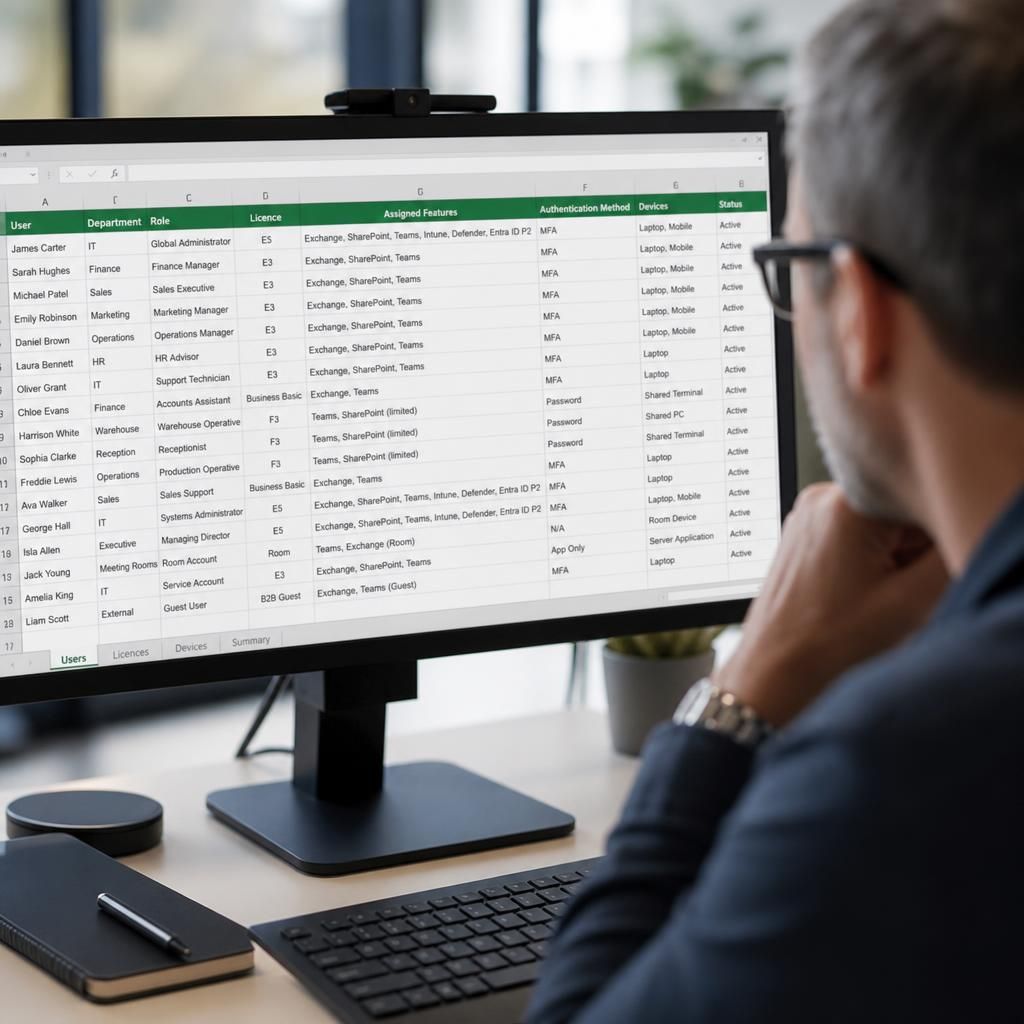
A major licensing decision before a Microsoft 365 migration is whether access should be licensed by user, device or a combination of both. User-based licensing is usually appropriate where individuals work across multiple devices, while device-based arrangements may suit shared computers, fixed workstations or environments where several people use the same equipment.
Review how each device is actually used rather than assuming that every account or workstation follows the same pattern. Consider shared reception computers, warehouse terminals, meeting-room devices, production-floor workstations and remote desktop environments separately. A shared device may require different treatment from a personally assigned laptop, particularly where users have different roles or access requirements.
- Identify devices used by multiple people and record the sign-in method.
- Separate personally assigned equipment from shared or fixed workstations.
- Check whether applications are accessed locally, through a browser or through a remote session.
- Confirm that the proposed licensing model supports the intended number and type of users on each device.
- Document exceptions so that shared-device arrangements are not replicated unnecessarily across the tenant.
This analysis helps prevent a migration design based solely on employee numbers. It also gives the project team a clearer basis for testing access on representative devices before the new environment becomes the standard working platform.
Review Your Microsoft 365 Licensing Plan
Ask S2 Technology Group to review your proposed Microsoft 365 licensing model before migration, including subscription dependencies, user assignments and compliance requirements. This can help identify entitlement gaps and clarify the decisions needed for a controlled transition.