

What costs should small businesses plan for beyond cloud subscription fees?
Beyond cloud subscription fees, small businesses should budget for migration planning, data transfer, software integration, connectivity upgrades, security controls, backup, user training and ongoing support. They should also check for one-off costs such as consultancy, replacing incompatible hardware or software, and meeting industry-specific compliance requirements.
Cloud subscription fees are only one part of the total cost of running cloud services. Small businesses should also account for usage-based charges, optional features, retained systems, internal administration, contract terms, transition disruption and the cost of reviewing the environment over time.
Usage and consumption charges
Some cloud services charge according to consumption rather than a fixed monthly amount. Relevant measures may include storage volume, data processing, transactions, application usage, data retrieval or transferring information out of the platform. A service that appears inexpensive at a low level of use can therefore cost more as staff numbers, customers, files or workloads increase.
Before agreeing to a service, establish which activities generate additional charges and whether billing is based on actual use, allocated capacity or a minimum commitment. Ask how unused capacity is treated, whether charges are calculated daily or monthly, and whether separate fees apply to archived or retained data.
Optional features and additional licences
The basic subscription may not include every function the business eventually needs. Costs can arise from extra user types, administrative accounts, enhanced reporting, larger storage allowances, automation, specialist application features or additional environments for development and testing. Some platforms also price services differently for external users, temporary workers or shared devices.
Prepare a realistic user and workload forecast rather than budgeting only for the current headcount. Include likely starters, leavers, seasonal users, multiple offices and future software requirements. This makes it easier to compare the advertised entry price with the cost of the configuration the business is actually likely to use.
Retained premises-based costs
Moving a workload to the cloud does not always remove every existing technology cost. A business may still need local equipment for printing, specialist machinery, telephony, building access, production systems or applications that cannot yet be moved. It may also retain hardware leases, maintenance agreements, equipment storage, power consumption or physical space.
List each existing cost and decide whether it will be removed, reduced, renewed or retained after the move. Avoid assuming that a cloud subscription automatically replaces every item associated with the former environment.
Internal administration and governance
Cloud services still require ownership. Staff may need time to manage user accounts, review invoices, approve changes, maintain documentation, monitor usage and coordinate suppliers. These activities may be performed by an employee, shared across several roles or assigned to an external IT provider, but they should be represented in the budget.
There can also be costs for documenting responsibilities, reviewing service configurations, maintaining an asset register and checking that departing users or unused resources are removed. Without this routine control, businesses can continue paying for services or capacity that no longer serves a purpose.
Transition and productivity effects
During a changeover, employees may spend time learning revised processes, working with temporary arrangements or checking that familiar tasks operate correctly. If systems need to run in parallel for a period, the business may temporarily pay for both old and new arrangements. There may also be a cost associated with rescheduling work, using temporary resources or allowing for reduced productivity while processes settle.
These are not necessarily permanent technology costs, but they affect the total budget. A sensible forecast separates one-off transition expenditure from the recurring cost of operating the finished cloud environment.
Contract, renewal and exit costs
Review the full commercial terms, not just the monthly price. Check minimum user or capacity commitments, renewal dates, price-change provisions, cancellation notice periods and charges for exceeding an allowance. A lower unit price may involve a longer commitment, while a flexible arrangement may have a higher ongoing rate.
Also establish what happens if the business changes provider or brings a service back in-house. Data export, conversion, temporary storage and professional assistance may all create exit costs. Recording these terms before signing helps the business assess the longer-term financial risk of being tied to a particular arrangement.
Professional and legal costs
Some businesses need specialist input to review supplier contracts, assess processing responsibilities, check insurance requirements or evaluate the effect of cloud use on sector-specific obligations. These costs vary according to the complexity of the environment and the organisation’s existing expertise. They should be treated as part of the project budget where external advice is required, rather than being assumed to be included in the subscription.
Build a total-cost model
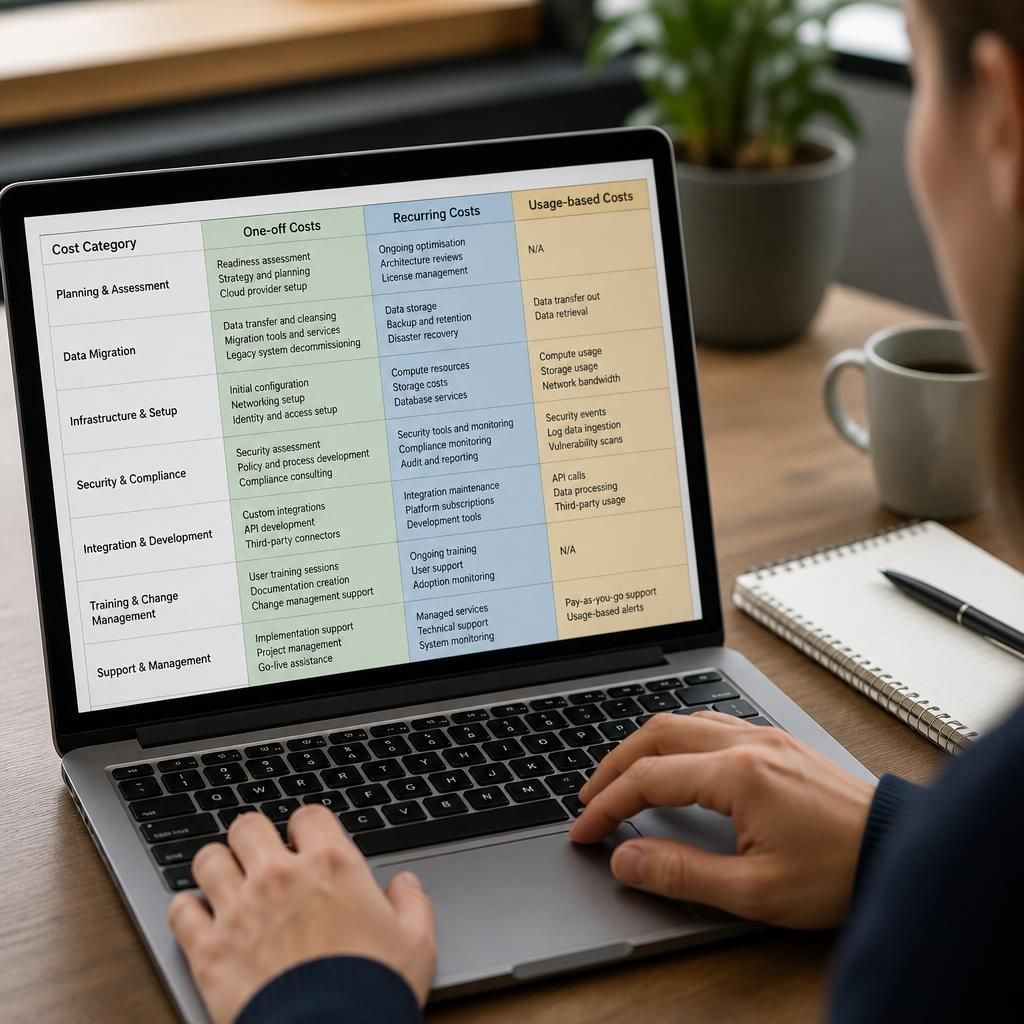
A practical budget should separate costs into one-off, recurring and usage-dependent categories:
- One-off: transition work, contract review, configuration, temporary parallel running and disposal or storage of retired equipment.
- Recurring: subscriptions, retained premises-based services, administration, equipment obligations and any paid add-on services.
- Variable: additional users, storage, processing, data movement and changes in workload.
- Contingency: reasonable allowance for requirements discovered after implementation or usage that differs from the forecast.
Review the model against several scenarios, such as the current number of users, planned growth and a period of unusually high usage. Ask suppliers for a complete schedule of charges and confirm which assumptions affect the estimate. This produces a more useful comparison than judging cloud migration by the headline subscription fee alone.
Cloud migration can create additional security and resilience costs because protection is rarely included in the basic subscription. A small business may need to budget for multi-factor authentication, endpoint security, access monitoring, encrypted backup and recovery testing, depending on the systems and information being moved.
Check whether each control is included in the chosen service, available as an optional feature or dependent on a separate product. Also allow for the work required to configure policies, review alerts, remove inappropriate access and test that data can actually be restored. These activities help turn a cloud environment into a controlled business system rather than simply a hosted location for files and applications.